As it turns out, the new model-based synchronization support that was added in Eclipse 3.2 makes use of the Common Navigator framework to allow models like Java to appear in the Synchronize view. Here's a screenshot that shows our Team Example model, a Java model and the Resource model all in the same CVS synchronization.
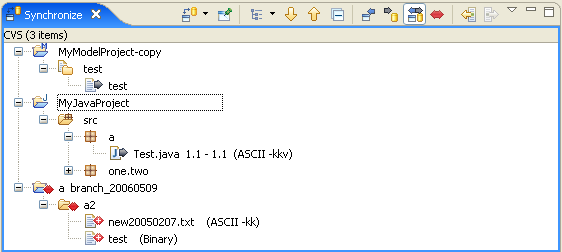
For those that are curious, the Team Example model is available in the org.eclipse.team.examples.filesystem plugin which you can get from the :pserver:anonymous@dev.eclipse.org:/cvsroot/eclipse repository or in the RC5 or later Eclipse Platform Example plug-ins download. The purpose of the example is to illustrate how to integrate logical models like Java with Team providers like CVS and includes Common Navigator extensions for both the Project Explorer and the Synchronize view. The RC5 version of the example is in reasonable shape but the version in HEAD is more complete.
No comments:
Post a Comment